IZItopo CAD
Draw your site and floor plans, to your own standard
The ZWCAD Pro plugin that makes office drafting easier. Build your symbol palettes: pick a symbol and it lands on the right layer, with its annotations. Draw your site and floor plans with the mouse, or by clicking in your point cloud.
What is IZItopo CAD for?
Three everyday uses, inside ZWCAD Pro
Make office drafting easier
Build your custom palettes: everyone has their own, to the firm's standard or a client's. Pick a symbol and place it: its layer and annotations follow.
Learn moreYour site plans from the point cloud
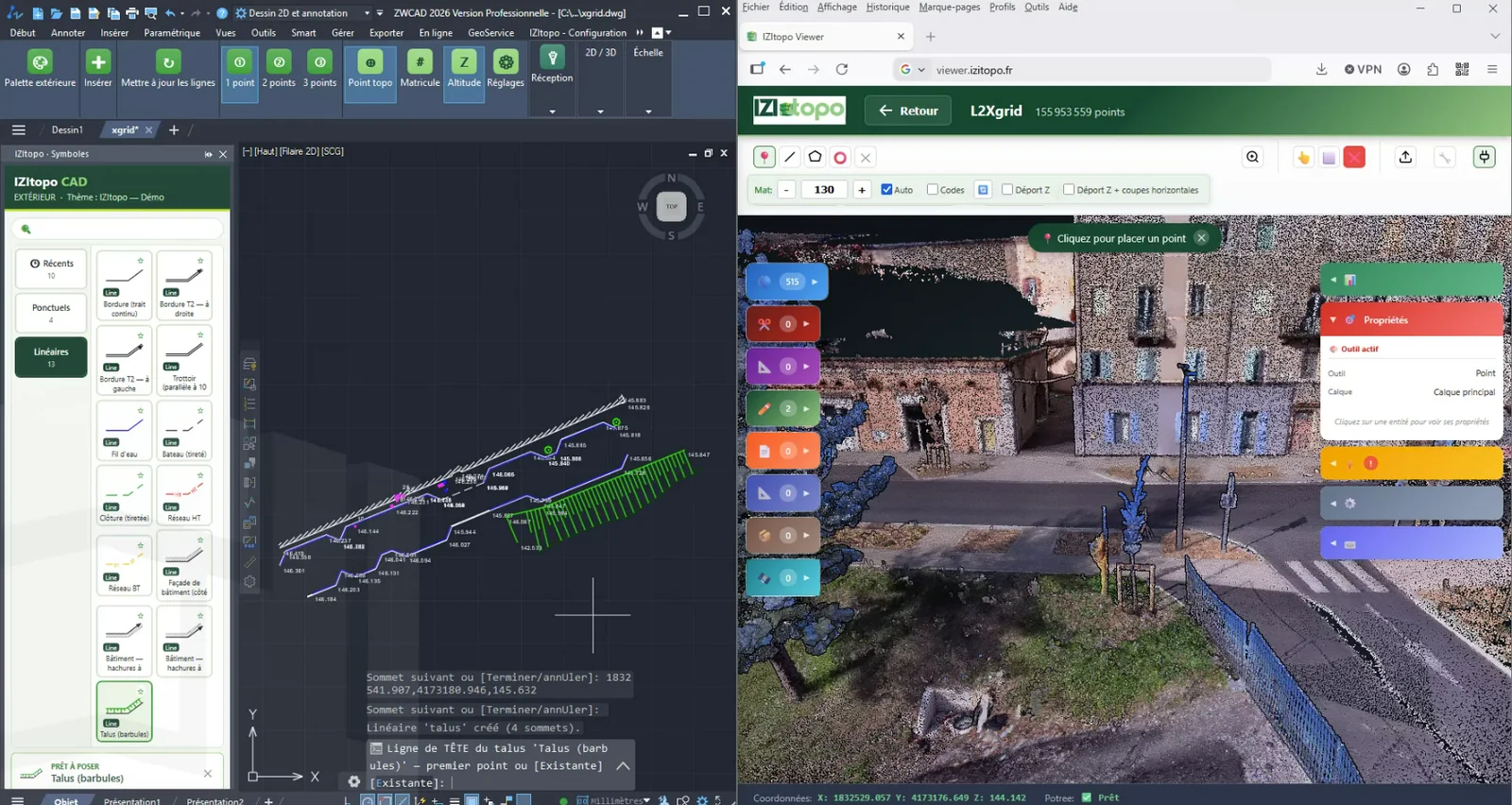
Pick a symbol or a line, then click in the point cloud open in IZItopo Viewer: your clicks count as clicks in ZWCAD, on the right layer and at the clicked point's coordinates.
Learn moreYour floor plans from the point cloud
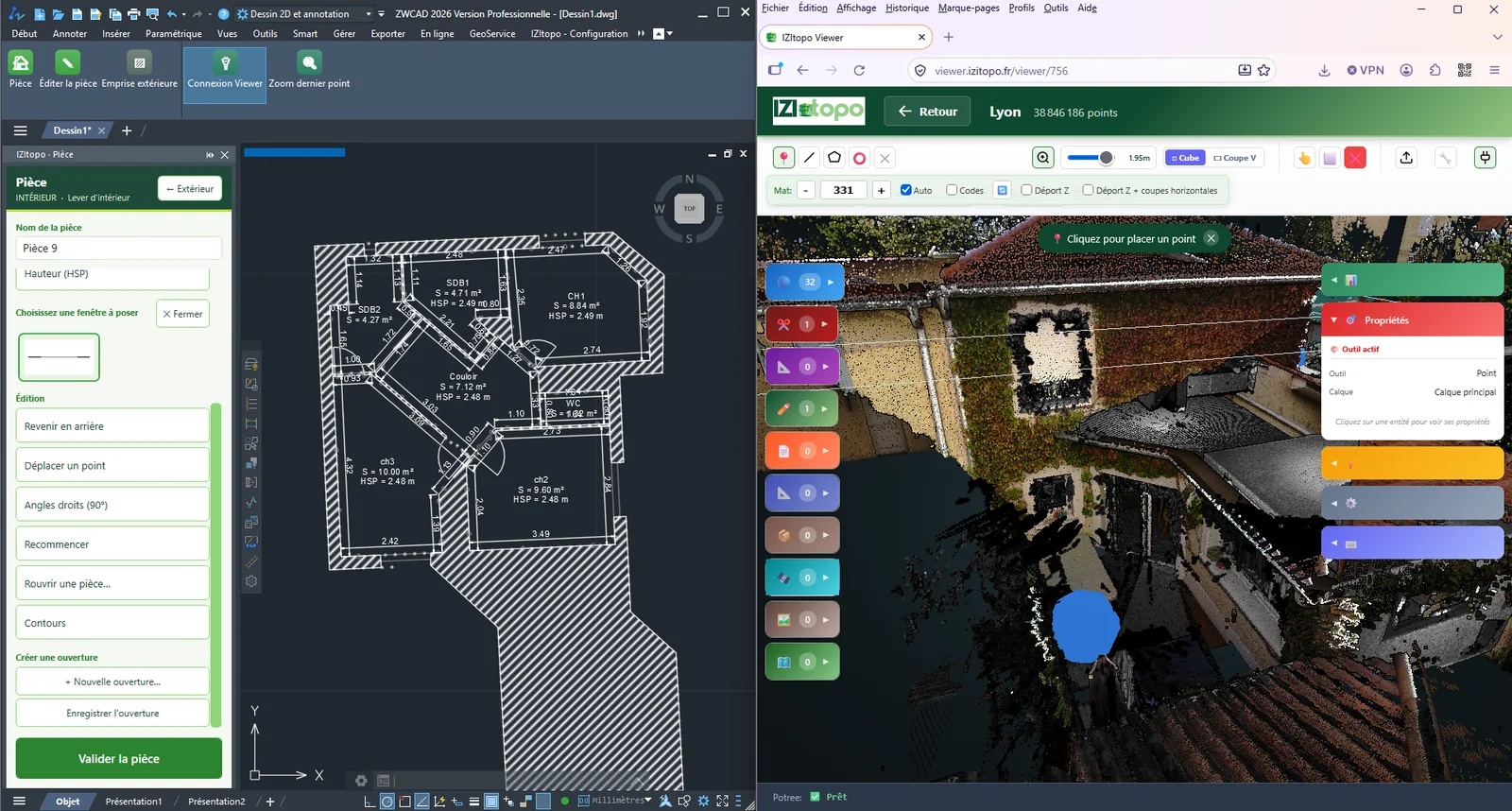
Click two points on each wall: the plugin computes the corners and draws measured rooms. Doors, windows and ceiling heights are added on top.
Learn moreFeatures
Everything you need to draw your plans to your own standard
Your palettes, to your standard
Layers, symbols, categories, business attributes: most of it is created from the palette, right where you draw. Start from scratch, from an existing DWG plan, or draw a symbol and show it to the plugin.
A palette that draws for you
Click a symbol: its layer is created if missing, attributes are entered once for the whole series, annotations are placed automatically. Point symbols in 1, 2 or 3 clicks.
Complete linear features, decorations included
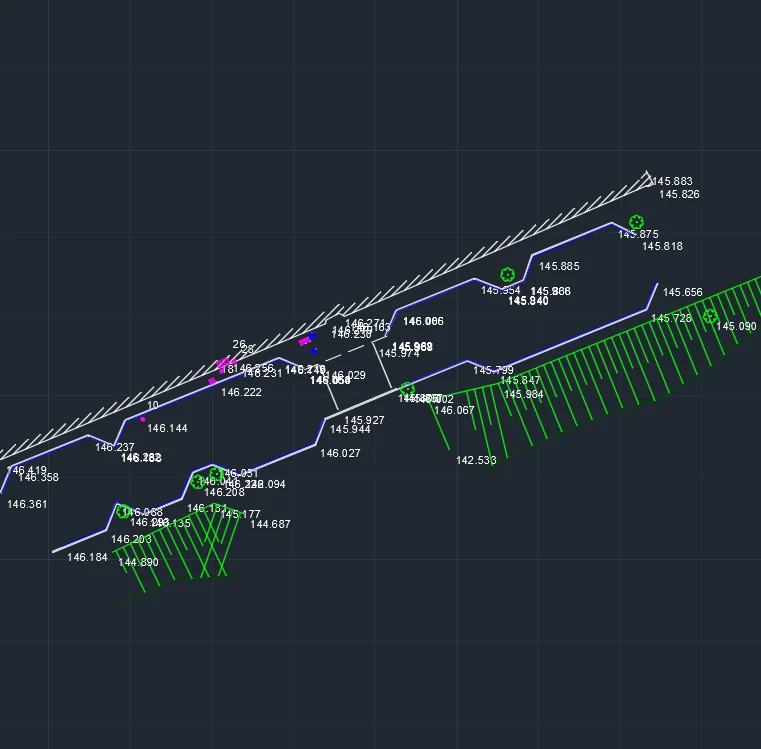
Doubled kerbs, hatched building fronts, embankments with slope hachures, utility lines with text running along them: every linear symbol in your standard is drawn with its decorations, to scale.
No proprietary format
Standard DWG blocks, native attributes, polylines, hatches: your plans stay readable in AutoCAD or BricsCAD, even without the plugin. Nothing locks you in.
A standard that travels
Your standard fits in a single folder, with its blocks and linetypes. Export it as one file, import it on another workstation and carry on without changing anything.
Survey points that stay in one piece
Optionally, the point number and elevation are carried by the point: move it and they follow. Each has its own layer: all elevations in red or all point numbers hidden, it takes a single setting.
From point cloud to site plan
The Viewer becomes your second mouse.
Connect the Viewer, pick a symbol in the palette, then click in the point cloud open in IZItopo Viewer: each click counts as a click in ZWCAD, on the right layer, at the clicked point's coordinates. A linear feature can be drawn entirely from the point cloud, then confirmed with Enter in ZWCAD.
- Point, linear and area symbols from your standard
- Mouse and point cloud alternate on the same line
- A one-click zoom brings the view back to the last point received, even in the middle of a line
- The point cloud stays in the Viewer: only the coordinates reach the drawing
From point cloud to floor plan
Click the walls, not the corners.
On a scan, corners are often hidden by furniture; walls never are. Click two points on each wall in IZItopo Viewer: the plugin computes the corners and rebuilds measured rooms.
- Areas, doors, windows and ceiling heights
- A door placed between two rooms opens both walls at once
- The plan can be edited with ZWCAD tools: everything is recalculated
- The plan is saved in the DWG: it can be reopened and edited later
How does it work?
Build your palettes
Layers, symbols and attributes from the palette, or the layers of an existing DWG plan as a starting point.
Draw or receive a survey
Place your symbols with the mouse or by clicking in the point cloud, or receive coordinates surveyed in the field.
The plan is done
Every object lands on its layer, with its attributes and annotations.
Connected to the IZItopo suite
IZItopo Field surveys in the field, IZItopo Viewer displays the point cloud, IZItopo CAD draws. Coordinates reach ZWCAD in three ways:
Copy and paste
Paste a list of coordinates (type, X, Y, Z): points are placed with the symbol selected in the palette, lines are drawn.
Watched folder
Turn on folder monitoring: every coordinate file (.txt, .csv, .tsv) dropped into it is read and drawn.
The Viewer as a second mouse
Turn on clipboard monitoring: every point clicked in the IZItopo Viewer point cloud is placed in your drawing, within the current command.
System requirements
- ZWCAD Pro 2026
- Windows 64-bit
- Installation kit, automatic updates
IZItopo CAD Pricing
As a perpetual license or a no-commitment subscription, with or without IZItopo Viewer
IZItopo CAD
The plugin alone, to draw your plans to your own standard
Perpetual license
€1,490
First year of maintenance included
then €290/year for maintenance
Or as a subscription
or €590/year
IZItopo CAD + Viewer Standard
The plugin plus your point clouds online, to draw your site and floor plans and share your point clouds
Perpetual license
€1,790
First year of maintenance included
then €590/year for maintenance
Viewer Standard is included in the software maintenance, and therefore in this price. It is not a perpetual license: without maintenance renewal, it stops at the end of the first year.
Or as a subscription
or €890/year
IZItopo CAD + Viewer Pro
The plugin plus the most complete Viewer plan, to draw your site and floor plans
Perpetual license
€2,090
First year of maintenance included
then €890/year for maintenance
Viewer Pro is included in the software maintenance, and therefore in this price. It is not a perpetual license: without maintenance renewal, it stops at the end of the first year.
Or as a subscription
or €1,190/year
In the office and in the field
Every plan also runs on a Windows tablet, at the same price: switch the plugin to its touch interface for larger buttons, palettes and windows sized for your finger. The license is floating: the same token moves from the office workstation to the tablet, on one device at a time.
Public prices excl. VAT, per floating token: one token runs on one device at a time.
Perpetual license: software maintenance covers updates, support and, in plans that include the Viewer, the Viewer of that plan. The first year is included in the purchase price. Without renewal, the plugin keeps working in the latest version available when maintenance ends, with no further updates.
Drawing from a point cloud, for site and floor plans alike, is done with the point cloud open in IZItopo Viewer.
Several tokens or a specific need? Contact us
Frequently asked questions about IZItopo CAD
What is IZItopo CAD for?
It makes drafting your plans in ZWCAD Pro easier. You build symbol palettes to your own standard, then draw your site and floor plans with the mouse, by clicking in a point cloud open in IZItopo Viewer, or from coordinates surveyed in the field.
Does IZItopo CAD work with AutoCAD?
No, the plugin runs on ZWCAD Pro 2026, on Windows. However, the plans it produces contain no proprietary entities: they open and can be edited in AutoCAD or BricsCAD without the plugin.
Do I need to know how to code to create my drawing standard?
No. Layers, symbols, categories, attributes and annotations are created in the interface, and a wizard guides you step by step through each new symbol. You can also start from an existing DWG plan: the plugin picks up its layers and infers how they are organized.
Is the point cloud imported into ZWCAD?
No. It stays displayed in IZItopo Viewer, in your browser. Only the coordinates of the points you click reach the drawing.
Who is IZItopo CAD designed for?
For land surveyors and engineering firms who draw their plans in ZWCAD Pro, to their own standard or to one imposed by a client.
Is the Viewer included when you buy a perpetual license?
Yes, in plans that include the Viewer: Viewer Standard or Pro is included in the software maintenance, and therefore in the price. It is still not a perpetual license, which covers the plugin only. The first year of maintenance is included in the purchase; after that, the annual renewal brings plugin updates, support and the Viewer. The Viewer ends with the maintenance: without renewal, it stops at the end of the first year.
What happens if I don't renew maintenance?
With a perpetual license, the plugin keeps working, in the latest version available when your maintenance ends. After that, no update is possible without maintenance. In plans that include the Viewer, the Viewer stops when maintenance ends.
Does IZItopo CAD run on a tablet?
Yes, on a Windows tablet running ZWCAD Pro 2026, in every plan and at the same price. Switch the plugin to its touch interface: larger buttons, palettes and windows sized for your finger. The license is floating: the same token moves from the office workstation to the tablet, on one device at a time.
Does IZItopo CAD connect to a GNSS receiver?
Not yet: the connection to GNSS receivers is under development. For now, coordinates surveyed in the field reach the drawing by copy and paste or through a watched folder.
Want to see your standard in IZItopo CAD?
Request a personalized demo: we'll show you how to build your standard and draw your plans with IZItopo CAD.
Request a demo